> ## Documentation Index
> Fetch the complete documentation index at: https://docs.rootprint.io/llms.txt
> Use this file to discover all available pages before exploring further.
# Create a custom index
> Define a custom index with your own schema, tokenizers, and retention from the Rootprint
The bundled `otel-logs-v0_9` index works for any application that emits OpenTelemetry logs. For everything else (audit trails, third-party log formats, application events with a specialized schema), create an index with the fields and types your data needs.
Create indexes from **Settings → Indexes → Create index**: a form, with no YAML or direct Quickwit calls. Rootprint creates the index in Quickwit and opens its detail page when you save, where you [map its fields](/configuration/manage-indexes#field-role-mappings) into the search UI.
The same form is available over the API as `POST /api/indexes`. See the [Index management
API](/api/overview).
## Index ID
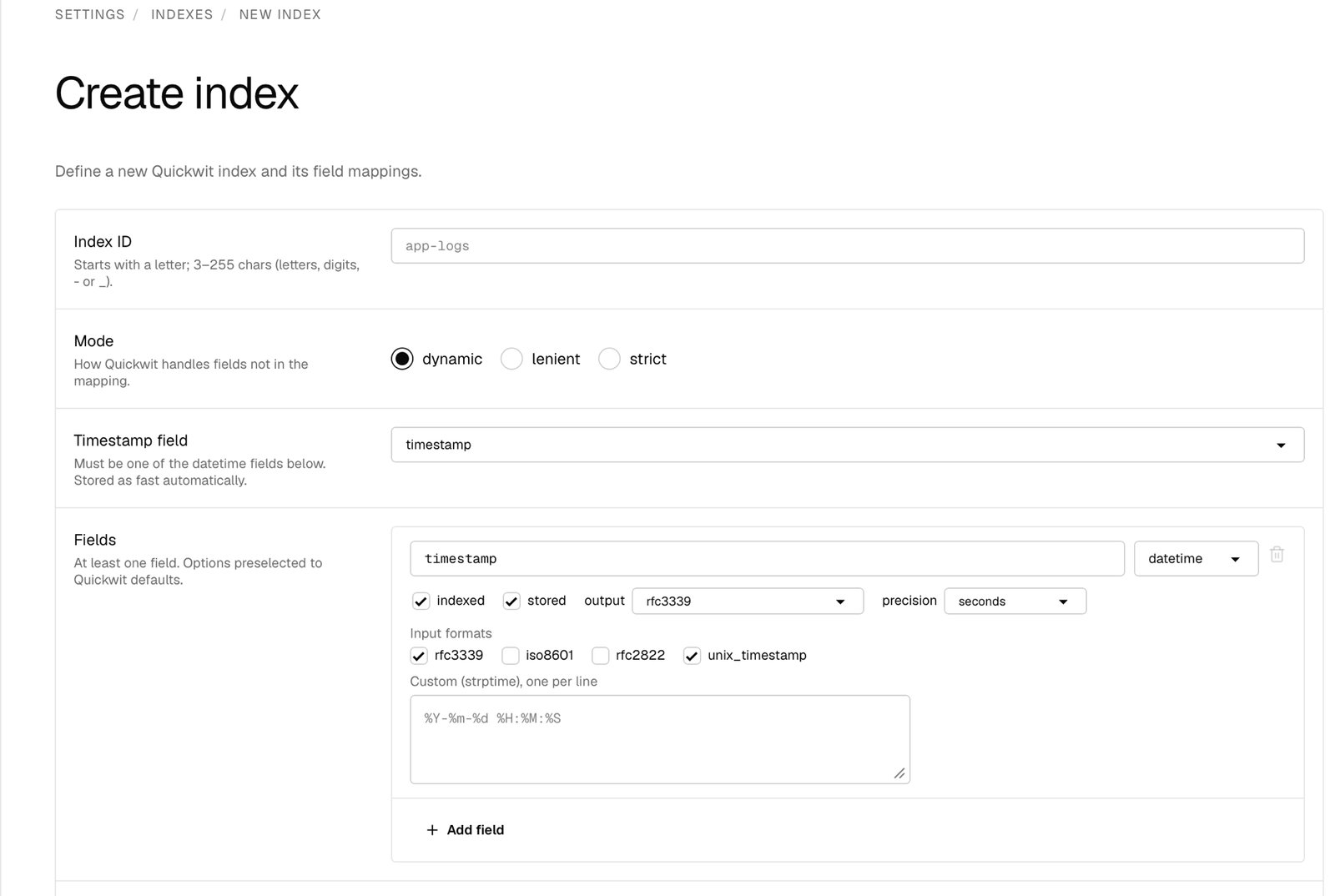 Starts with a letter; 3–255 characters of letters, digits, `-`, or `_`. This is the index ID, and the value you pass as the `index` when ingesting.
## Mode
The schema mode decides what Quickwit does with fields you didn't declare in the field mappings.
| Mode | Behavior |
| --------- | ------------------------------------------------------------------------------------------------------------------------------------ |
| `dynamic` | Default. Unknown fields are stored under a JSON catch-all and remain searchable. Most flexible — recommended unless you need rigour. |
| `lenient` | Unknown fields are silently dropped at indexing. A stable schema without noisy errors from extra fields. |
| `strict` | Unknown fields cause Quickwit to reject the document. The bundled `otel-logs-v0_9` index uses this mode. |
## Timestamp field
Pick the `datetime` field the index uses as its time axis, chosen from the datetime fields you define below. It is used to:
* Partition splits by time, so time-bounded searches only scan relevant splits.
* Drive the retention policy.
* Enforce search bounds: the Rootprint time picker passes `start_timestamp` and `end_timestamp` against this field.
Rootprint always stores the timestamp field as `fast`, so its `fast` toggle is hidden in the field editor. You must define at least one `datetime` field before you can pick one here.
## Fields
Starts with a letter; 3–255 characters of letters, digits, `-`, or `_`. This is the index ID, and the value you pass as the `index` when ingesting.
## Mode
The schema mode decides what Quickwit does with fields you didn't declare in the field mappings.
| Mode | Behavior |
| --------- | ------------------------------------------------------------------------------------------------------------------------------------ |
| `dynamic` | Default. Unknown fields are stored under a JSON catch-all and remain searchable. Most flexible — recommended unless you need rigour. |
| `lenient` | Unknown fields are silently dropped at indexing. A stable schema without noisy errors from extra fields. |
| `strict` | Unknown fields cause Quickwit to reject the document. The bundled `otel-logs-v0_9` index uses this mode. |
## Timestamp field
Pick the `datetime` field the index uses as its time axis, chosen from the datetime fields you define below. It is used to:
* Partition splits by time, so time-bounded searches only scan relevant splits.
* Drive the retention policy.
* Enforce search bounds: the Rootprint time picker passes `start_timestamp` and `end_timestamp` against this field.
Rootprint always stores the timestamp field as `fast`, so its `fast` toggle is hidden in the field editor. You must define at least one `datetime` field before you can pick one here.
## Fields
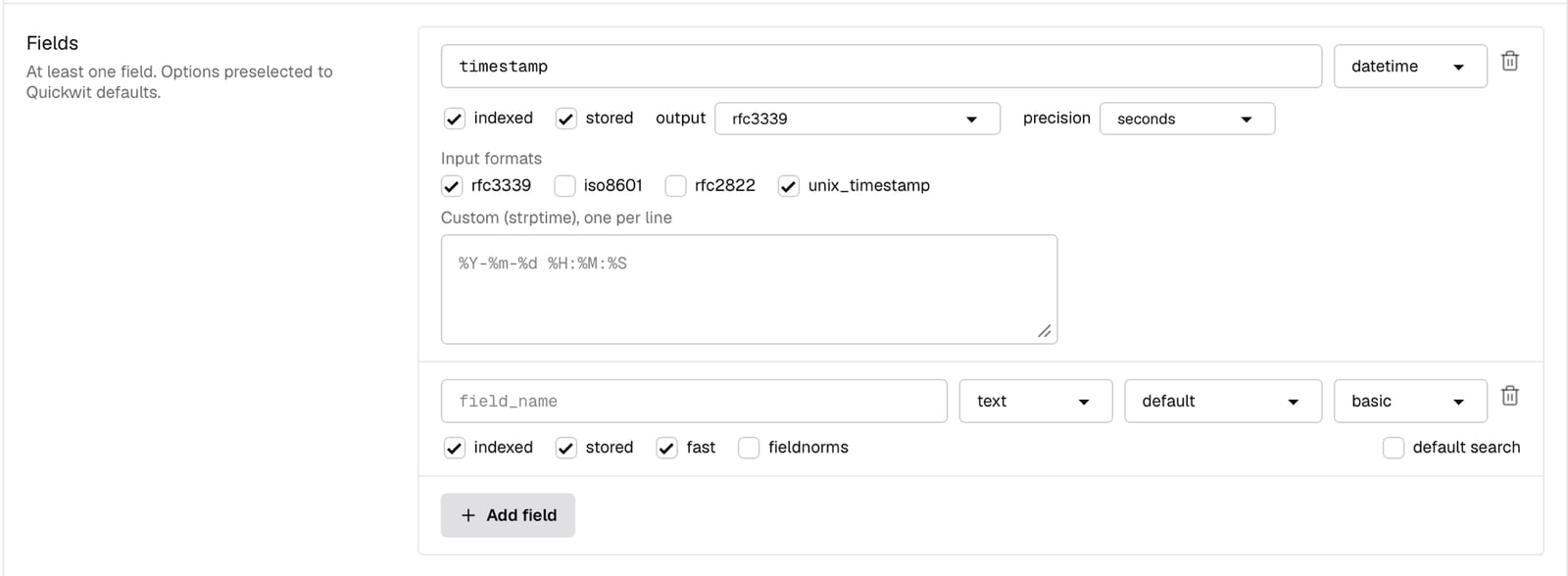 Add a row per field with **Add field**, then set its name, type, and options. At least one field is required, and the toggles come preselected to the recommended defaults (`indexed`, `stored`, and `fast` on).
### Field types
| Type | Use for |
| ---------- | ------------------------- |
| `text` | Searchable strings |
| `i64` | Signed integers |
| `u64` | Unsigned integers |
| `f64` | Floating point |
| `datetime` | Timestamps |
| `bool` | True/false |
| `ip` | IPv4/IPv6 addresses |
| `json` | Free-form key-value blobs |
### Indexed, stored, and fast
Every field exposes three toggles:
* **Indexed**: the field is added to an inverted index and is searchable via text queries. When off, you cannot use the field in search predicates.
* **Stored**: the field's value is kept and returned in search results.
* **Fast**: the field is stored in column-oriented storage (like Lucene DocValues), enabling efficient range queries, aggregations, and sorting. The form preselects `fast` on for every field; the timestamp field is always fast.
### Per-type options
Depending on the field type, the editor exposes extra options:
| Type | Options |
| --------------------- | ------------------------------------------------------------------------------------- |
| `text` | **tokenizer**, **record**, **fieldnorms** (store field-length norms for scoring) |
| `json` | **tokenizer**, **record**, **expand dots** (treat `a.b` keys as nested `a` → `b`) |
| `i64` / `u64` / `f64` | **coerce** (accept numbers sent as strings) |
| `datetime` | **output** format, **precision** of the fast value, and **input formats** (see below) |
`text` and `json` fields also have a **default search** checkbox. Tick it to add the field to the index's default search fields — the fields searched when a query doesn't name one, so `timeout` matches `message:timeout` without the user typing the field.
The **record** option controls how much term data the inverted index keeps: `basic` (which documents contain the term), `freq` (also term frequency), or `position` (also token positions, required for phrase queries).
For `datetime` fields, **input formats** is how Rootprint parses incoming values. Tick any of the presets (`rfc3339`, `iso8601`, `rfc2822`, `unix_timestamp`) and add custom [strptime](https://docs.rs/chrono/latest/chrono/format/strftime/index.html) patterns one per line. **Output** controls how values are returned (`rfc3339` or `unix_timestamp_secs`/`millis`/`micros`/`nanos`), and **precision** sets the granularity of the fast column (`seconds`, `milliseconds`, `microseconds`, `nanoseconds`).
### Tokenizers
`text` and `json` fields take a tokenizer, which decides how the value is split for search. Tokenization happens at index time and cannot be changed without recreating the index.
| Tokenizer | Behavior | Use for |
| -------------------- | ------------------------------------------------------------------- | ------------------------------------------- |
| `raw` | Whole value as one token. Case-sensitive. | IDs, enums, hostnames, severity labels |
| `raw_lowercase` | Whole value as one token, lowercased. Case-insensitive exact match. | Enum-like fields matched regardless of case |
| `default` | Splits on whitespace and punctuation, lowercases. | Free-text search on message bodies |
| `en_stem` | `default` plus English stemming (`running` → `run`). | Free-text with morphological matching |
| `whitespace` | Splits on whitespace only; keeps case and punctuation. | Text where punctuation is significant |
| `chinese_compatible` | Per-character CJK splitting plus `default` behavior. | Mixed CJK and Latin text |
| `lowercase` | Lowercases the value with minimal tokenization. | Case-insensitive enum-like fields |
The bundled OTel index uses `raw` for `severity_text` and `service_name`, and `default` for `body`. The same choices work well for most application logs.
## Retention
Enable retention to drop splits older than a fixed window. **Period** accepts durations like `48 hours`, `90 days`, `12 months`, `2 years`; **schedule** controls how often the cleanup runs (`hourly`, `daily`, `weekly`, `monthly`, `yearly`, or a cron expression), and defaults to daily when left blank.
Retention drops entire splits, so the actual cutoff floats by the split duration. A document
timestamped 30 days ago is not deleted at exactly day 30 — its split survives until every document
in it is past the period. Plan for hours of lag, not seconds.
## Other settings
Add a row per field with **Add field**, then set its name, type, and options. At least one field is required, and the toggles come preselected to the recommended defaults (`indexed`, `stored`, and `fast` on).
### Field types
| Type | Use for |
| ---------- | ------------------------- |
| `text` | Searchable strings |
| `i64` | Signed integers |
| `u64` | Unsigned integers |
| `f64` | Floating point |
| `datetime` | Timestamps |
| `bool` | True/false |
| `ip` | IPv4/IPv6 addresses |
| `json` | Free-form key-value blobs |
### Indexed, stored, and fast
Every field exposes three toggles:
* **Indexed**: the field is added to an inverted index and is searchable via text queries. When off, you cannot use the field in search predicates.
* **Stored**: the field's value is kept and returned in search results.
* **Fast**: the field is stored in column-oriented storage (like Lucene DocValues), enabling efficient range queries, aggregations, and sorting. The form preselects `fast` on for every field; the timestamp field is always fast.
### Per-type options
Depending on the field type, the editor exposes extra options:
| Type | Options |
| --------------------- | ------------------------------------------------------------------------------------- |
| `text` | **tokenizer**, **record**, **fieldnorms** (store field-length norms for scoring) |
| `json` | **tokenizer**, **record**, **expand dots** (treat `a.b` keys as nested `a` → `b`) |
| `i64` / `u64` / `f64` | **coerce** (accept numbers sent as strings) |
| `datetime` | **output** format, **precision** of the fast value, and **input formats** (see below) |
`text` and `json` fields also have a **default search** checkbox. Tick it to add the field to the index's default search fields — the fields searched when a query doesn't name one, so `timeout` matches `message:timeout` without the user typing the field.
The **record** option controls how much term data the inverted index keeps: `basic` (which documents contain the term), `freq` (also term frequency), or `position` (also token positions, required for phrase queries).
For `datetime` fields, **input formats** is how Rootprint parses incoming values. Tick any of the presets (`rfc3339`, `iso8601`, `rfc2822`, `unix_timestamp`) and add custom [strptime](https://docs.rs/chrono/latest/chrono/format/strftime/index.html) patterns one per line. **Output** controls how values are returned (`rfc3339` or `unix_timestamp_secs`/`millis`/`micros`/`nanos`), and **precision** sets the granularity of the fast column (`seconds`, `milliseconds`, `microseconds`, `nanoseconds`).
### Tokenizers
`text` and `json` fields take a tokenizer, which decides how the value is split for search. Tokenization happens at index time and cannot be changed without recreating the index.
| Tokenizer | Behavior | Use for |
| -------------------- | ------------------------------------------------------------------- | ------------------------------------------- |
| `raw` | Whole value as one token. Case-sensitive. | IDs, enums, hostnames, severity labels |
| `raw_lowercase` | Whole value as one token, lowercased. Case-insensitive exact match. | Enum-like fields matched regardless of case |
| `default` | Splits on whitespace and punctuation, lowercases. | Free-text search on message bodies |
| `en_stem` | `default` plus English stemming (`running` → `run`). | Free-text with morphological matching |
| `whitespace` | Splits on whitespace only; keeps case and punctuation. | Text where punctuation is significant |
| `chinese_compatible` | Per-character CJK splitting plus `default` behavior. | Mixed CJK and Latin text |
| `lowercase` | Lowercases the value with minimal tokenization. | Case-insensitive enum-like fields |
The bundled OTel index uses `raw` for `severity_text` and `service_name`, and `default` for `body`. The same choices work well for most application logs.
## Retention
Enable retention to drop splits older than a fixed window. **Period** accepts durations like `48 hours`, `90 days`, `12 months`, `2 years`; **schedule** controls how often the cleanup runs (`hourly`, `daily`, `weekly`, `monthly`, `yearly`, or a cron expression), and defaults to daily when left blank.
Retention drops entire splits, so the actual cutoff floats by the split duration. A document
timestamped 30 days ago is not deleted at exactly day 30 — its split survives until every document
in it is past the period. Plan for hours of lag, not seconds.
## Other settings
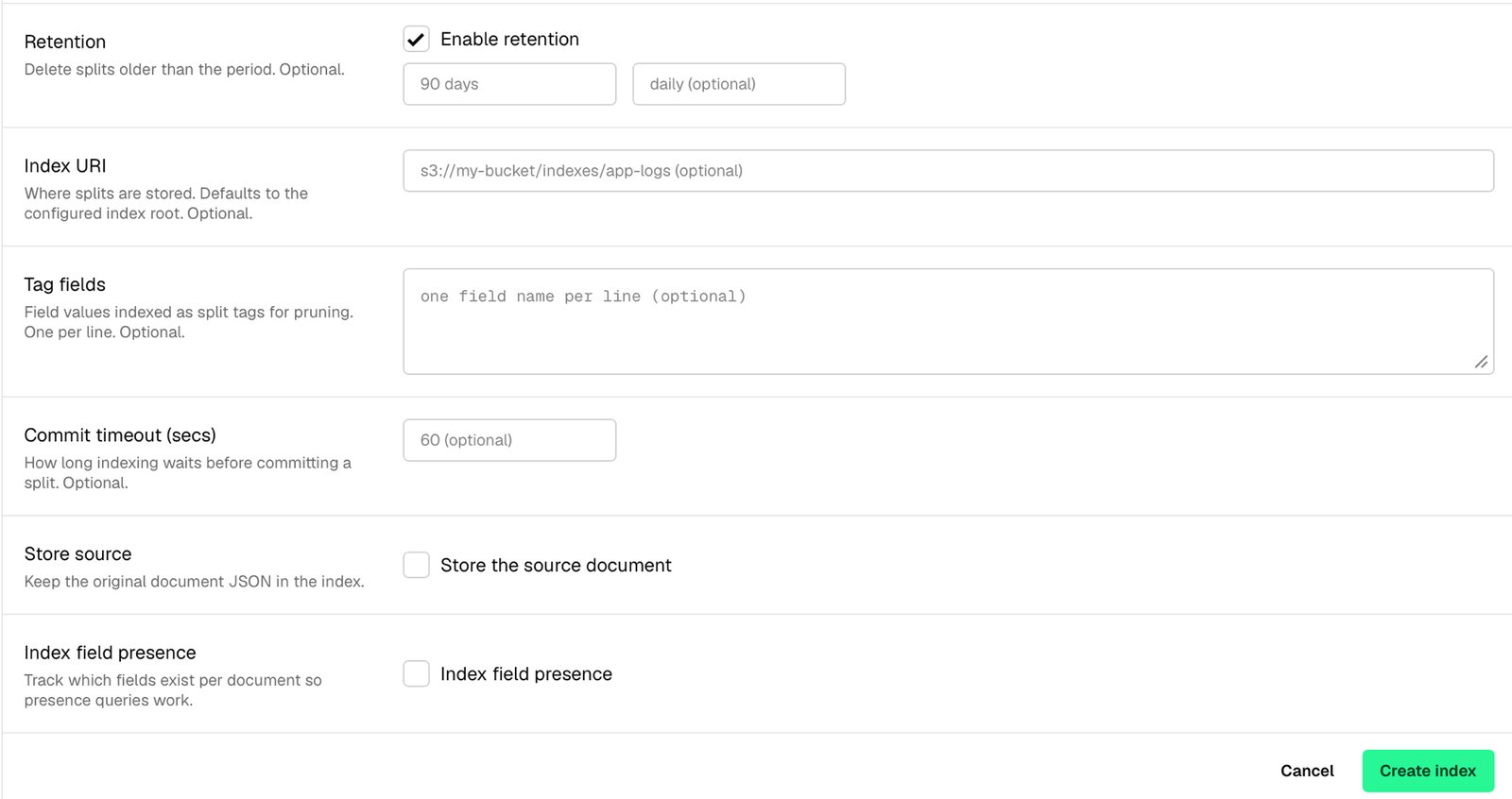 The rest of the form is optional and most deployments leave it untouched:
| Setting | What it does |
| ------------------------- | --------------------------------------------------------------------------------------------------------------------------------------------------------- |
| **Index URI** | Where splits are stored. Defaults to the configured index root. Set it to put this index on a different bucket or path. |
| **Tag fields** | Low-cardinality field names (one per line) indexed so the engine can skip data efficiently before scanning. |
| **Commit timeout (secs)** | How long indexing waits before forcing a commit. Defaults to `60`. Lower it to make new documents searchable sooner, at the cost of more, smaller splits. |
| **Store source** | Keep the original document JSON in the index alongside the mapped fields. |
| **Index field presence** | Track which fields exist per document so presence queries (does this field exist?) work. |
## Use it from Rootprint
Saving the form lands you on the new index's detail page. To finish wiring it up:
1. On the **Configuration** tab, set the [field-role mappings](/configuration/manage-indexes#field-role-mappings) so the message, level, and traceback render correctly.
2. Create an [ingest API key](/api/overview) scoped to the index and route writes through the [HTTP endpoint](/send-logs/http) or, for OpenTelemetry-shaped data, the [OTLP endpoint](/send-logs/otlp).
## Related
* [Manage indexes](/configuration/manage-indexes): the index list, field-role mapping, fields, sources, and deletion.
* [Indexes](/indexes): the bundled `otel-logs-v0_9` schema.
* [Search query syntax](/search/query-language): what users can query against your fields.
* [Quickwit index configuration reference](https://quickwit.io/docs/configuration/index-config): the full upstream schema.
The rest of the form is optional and most deployments leave it untouched:
| Setting | What it does |
| ------------------------- | --------------------------------------------------------------------------------------------------------------------------------------------------------- |
| **Index URI** | Where splits are stored. Defaults to the configured index root. Set it to put this index on a different bucket or path. |
| **Tag fields** | Low-cardinality field names (one per line) indexed so the engine can skip data efficiently before scanning. |
| **Commit timeout (secs)** | How long indexing waits before forcing a commit. Defaults to `60`. Lower it to make new documents searchable sooner, at the cost of more, smaller splits. |
| **Store source** | Keep the original document JSON in the index alongside the mapped fields. |
| **Index field presence** | Track which fields exist per document so presence queries (does this field exist?) work. |
## Use it from Rootprint
Saving the form lands you on the new index's detail page. To finish wiring it up:
1. On the **Configuration** tab, set the [field-role mappings](/configuration/manage-indexes#field-role-mappings) so the message, level, and traceback render correctly.
2. Create an [ingest API key](/api/overview) scoped to the index and route writes through the [HTTP endpoint](/send-logs/http) or, for OpenTelemetry-shaped data, the [OTLP endpoint](/send-logs/otlp).
## Related
* [Manage indexes](/configuration/manage-indexes): the index list, field-role mapping, fields, sources, and deletion.
* [Indexes](/indexes): the bundled `otel-logs-v0_9` schema.
* [Search query syntax](/search/query-language): what users can query against your fields.
* [Quickwit index configuration reference](https://quickwit.io/docs/configuration/index-config): the full upstream schema.